Wire your network by dragging boxes.
NetGrip shows your machine's network as it really is — NICs are boxes, and every IP, VLAN and bond is its own box joined by a line. Move an address by dragging it. Build a bond by dropping one NIC onto another. See the exact commands before anything runs.
$ pipx install git+https://github.com/theyoungrossco/netgrip.git
Free & open source · GPL-3.0 · Linux & Windows (SSH) · Python ≥ 3.10
Direct manipulation
Your network, as boxes and lines
No config-file archaeology. NetGrip reads live state with ip -json and lays it out on a flat canvas. Every gesture maps to a real change you can see before it happens.
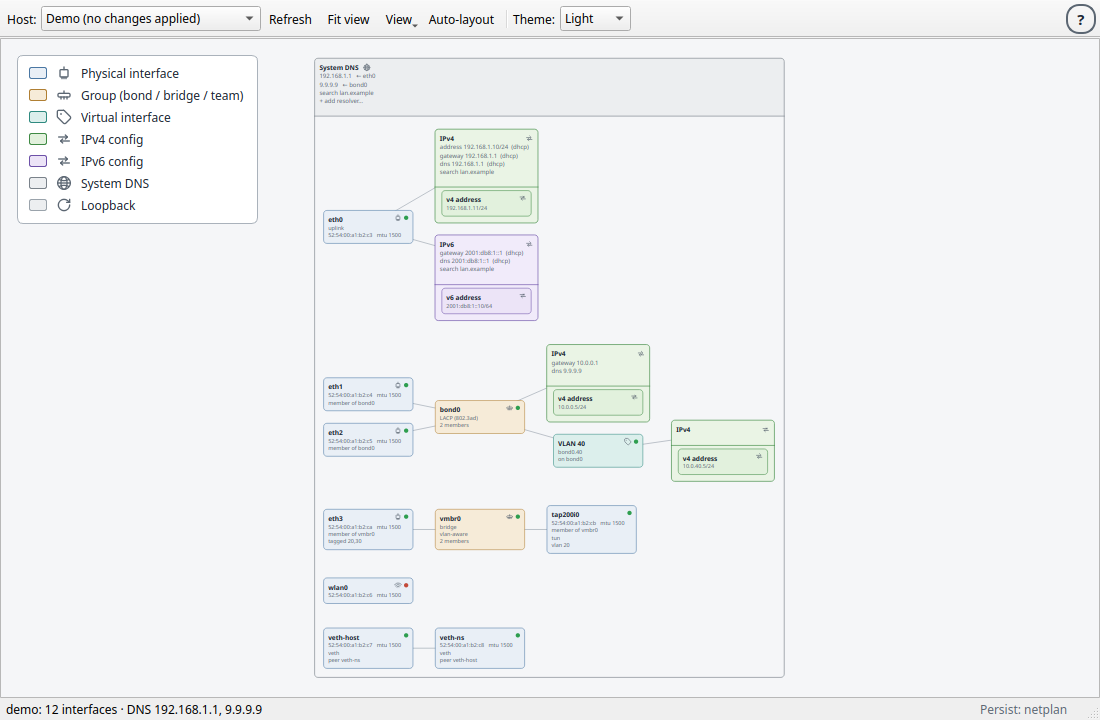
What the boxes mean
- Physical interface (NIC)
- Group — bond / bridge / team
- Virtual interface / VLAN
- IPv4 config
- IPv6 config
- System DNS
Lines are links. Drag a box, and its configuration goes with it.
Drag an IP between NICs
Pick up an address box and drop it on another interface — the address moves. Ctrl-drag to clone it instead.
Drop a NIC onto a NIC to bond
Create failover, LACP and the other kernel bonding modes by hand. Right-click to change mode or membership.
Stack VLANs and addresses
An IP config on a VLAN on a bond of two NICs. Detach any config to a floating draft and re-attach it later.
Review, then apply
NetGrip shows the exact commands it will run and waits for your OK — locally via sudo/pkexec or remotely over ssh.
Highlights
Everything is a gesture
The whole network model is on one canvas, and each part of it is something you can grab.
Drag to move, Ctrl-drag to clone
Move an IP address from one NIC to another by dragging the box. Hold Ctrl to duplicate it instead.
Bonds by hand
Drop one NIC onto another to build a bond — failover, LACP, and every other kernel bonding mode.
VLANs & drafts
Right-click the canvas to start a draft VLAN, give it an id and addresses, then drag it onto a parent.
Per-family IP groups
Addresses group into IPv4/IPv6 boxes carrying that family's gateway, DNS servers and search domains.
Manage remotes over SSH
Use your existing ~/.ssh/config, keys and agent to manage any reachable Linux box — nothing is installed on it.
Try before you commit
Apply a change that auto-reverts after a countdown unless you keep it. Test risky edits without fear.
System DNS, demystified
A host-wide DNS box reads /etc/resolv.conf and shows exactly where each resolver comes from.
Light & dark, remembered
Follows your desktop theme with a manual override. Box positions, names and drafts are saved per host.
Safe by design
Nothing changes until you say so
NetGrip never edits behind your back. It expands each action into concrete iproute2 commands and shows them to you first. What you approve is exactly what executes — as a single confirmed batch.
- Reading network state needs no privileges at all.
- Changes land on the running stack first — real and immediate.
- Save persists across reboots through your host's backend.
- Try applies a change and auto-reverts it on a timer.
# NetGrip will run these commands and wait for your OK
sudo ip link add bond0 type bond mode 802.3ad
sudo ip link set eth1 master bond0
sudo ip link set eth2 master bond0
sudo ip link add link bond0 name bond0.40 \
       type vlan id 40
sudo ip addr add 10.0.40.5/24 dev bond0.40
sudo ip link set bond0 up

▸ Apply   ▸ Try (revert in 0:10)   ▸ Cancel
See it
The demo host, on one canvas
Two NICs bonded with LACP, a VLAN on the bond, per-family IP groups carrying their gateway and DNS, and a System DNS box. Try it yourself with netgrip --demo — every gesture works, nothing executes.
Get started
Install in a minute
Any Linux distro from the last several years works — Python ≥ 3.10 and iproute2 ≥ 4.14. NetGrip installs in isolation and never touches your system Python.
Clone and run the installer — it sets NetGrip up in isolation and adds a menu entry.
$ git clone https://github.com/theyoungrossco/netgrip.git
$ cd netgrip
$ ./scripts/install-linux.sh
Uses pipx if present, else a private virtualenv. Remove with ./scripts/install-linux.sh --uninstall; install for all users with sudo ./scripts/install-linux.sh --system.
Just want the command, no menu entry?
$ pipx install git+https://github.com/theyoungrossco/netgrip.gitThen run netgrip to manage this machine, netgrip --host user@box for a remote, or netgrip --demo to explore safely.
On Windows, NetGrip is an SSH-only remote control — no local stack to manage.
Download the latest NetGrip-*-setup.exe from the Releases page and run it. It bundles Python and Qt, installs without an admin prompt, and adds a Start-Menu shortcut. Pick a host from your ~/.ssh/config or type user@host to connect.
Support the project
Help NetGrip reach 1.0
NetGrip is free, open source and built in the open. Sponsorship funds distro packaging (apt & friends), broader backend coverage, signed Windows builds, and the testing it takes to move from alpha to a rock-solid release.
- Your logo here and in the project README
- A direct line to influence the roadmap
- Backing a genuinely open (GPL-3.0) networking tool
Prefer email? Reach out and we'll find a tier that fits.